Introduction
Keyboard keycaps are often overlooked, yet they play a critical role in both the typing experience and the aesthetics of your keyboard. Whether you are a professional typist, a gamer, or a hobbyist building a custom mechanical keyboard, understanding keycaps can enhance comfort, performance, and style. This guide will explain what keycaps are, why they matter, and how to select, maintain, and enjoy them for years to come.
What Are Keyboard Keycaps?
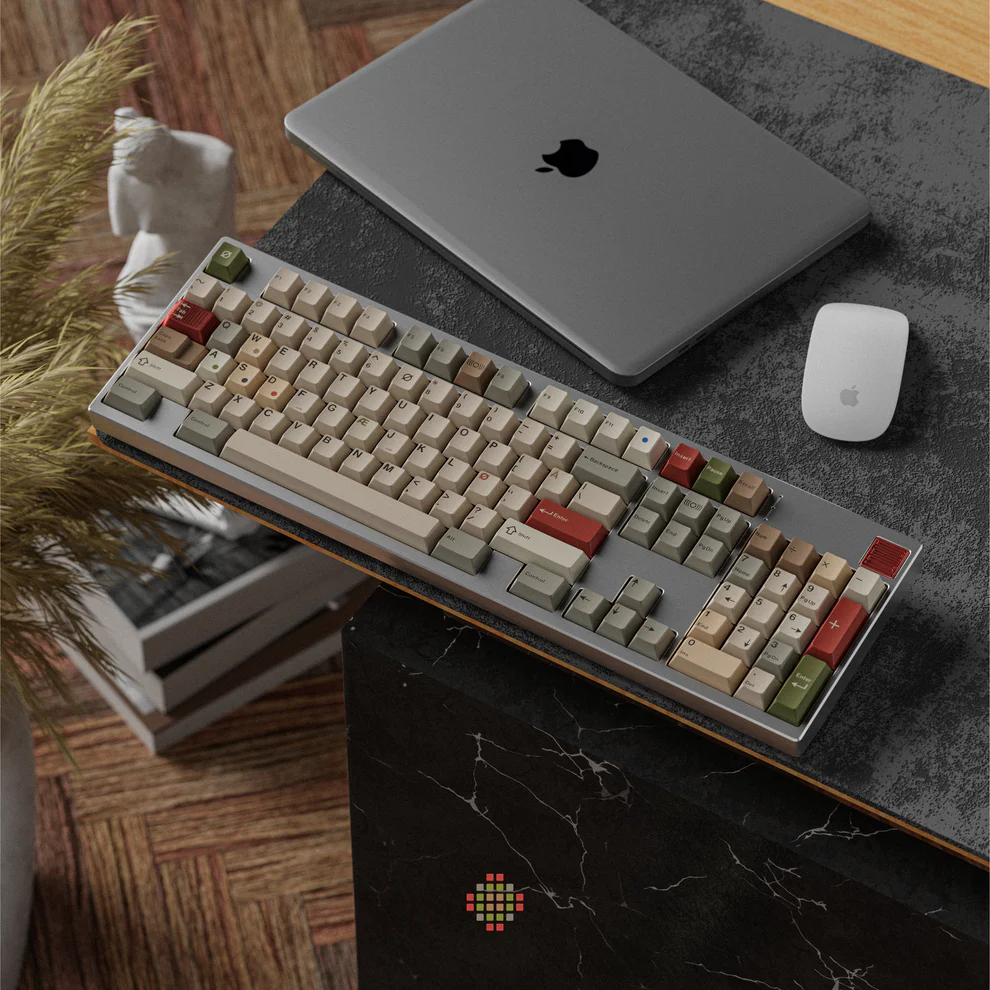
Keyboard keycaps are the physical tops of your keyboard switches—the parts you actually press when typing. They come in a variety of materials, shapes, and designs, each affecting typing feel and sound. Most keycaps fit over mechanical switches, but there are also versions for membrane and scissor-switch keyboards. For example, ABS (Acrylonitrile Butadiene Styrene) keycaps are lightweight and affordable, while PBT (Polybutylene Terephthalate) keycaps are more durable and resistant to shine over time. Understanding the keycap material and compatibility with your switches is the first step to creating a comfortable and long-lasting keyboard. You can explore a wide range of keyboard keycaps for different layouts and profiles.
Why Are Keycaps Important for Your Keyboard?
Keycaps are not just decorative—they significantly affect typing feel, acoustics, and ergonomics. The thickness, material, and profile determine how each keystroke feels and sounds. For example, thicker PBT keycaps reduce vibrations and produce a more muted typing sound, which can be important for office or shared spaces. According to a study by Keyboard University, high-quality keycaps can improve typing speed by up to 10% due to better tactile feedback.
Keycaps also impact longevity. Low-quality ABS keycaps may develop shiny surfaces after heavy use, while high-end PBT or resin keycaps maintain texture and appearance over years. From a practical standpoint, keycaps allow customization, helping users tailor keyboards for specific use cases—like gaming layouts, ergonomic setups, or aesthetic themes. They also make it easier to replace damaged or worn keys without changing the entire keyboard.
What Are the Different Types of Keycaps?
Keycaps are categorized by material, printing method, and compatibility. Common materials include:
| Material | Pros | Cons |
| ABS | Affordable, smooth texture | Can develop shine, less durable |
| PBT | Durable, resists shine, textured feel | Slightly more expensive |
| POM | Smooth and low friction, good sound | Limited color options |
Printing methods affect durability and appearance:
· Pad Printing: Cost-effective but can fade quickly.
· Double-Shot: Durable and visually striking; legends never wear off.
· Laser Etching: Precise but less common for thick PBT keycaps.
Additionally, keycaps differ by switch compatibility (Cherry MX style, Topre, Alps, etc.) and keyboard size/layout. Users building custom keyboards often consider hot-swappable or modular switches, which allow easy keycap replacement. Check out our keyboard keycaps collection for a variety of compatible options.
How to Choose the Right Keycap Material?
Choosing the right keycap material depends on your typing habits, sound preference, and budget. For everyday office use, PBT keycaps are preferred for their durability and minimal shine over time. Gamers may prefer thicker ABS or PBT keycaps for tactile feedback and faster response. For enthusiasts, artisan resin keycaps provide unique aesthetics, although they may cost significantly more.
Other considerations include:
· Profile: Sculpted profiles like SA or DSA affect typing ergonomics.
· Sound: Thicker PBT reduces high-pitched “clack,” while ABS often sounds sharper.
· Texture: Smooth keycaps feel faster for typing; textured ones reduce finger slippage.
According to data from Keyboard Co., keyboards with high-quality PBT keycaps have a 30% longer lifespan compared to entry-level ABS keycaps, making them a cost-effective long-term investment. Pairing your chosen keycap with compatible switches ensures a comfortable and consistent typing experience.
What Are the Popular Keycap Profiles and Designs?
Keycap profiles define the shape and height of keys. Popular profiles include:
· OEM: Standard, slightly sculpted, compatible with most keyboards.
· Cherry: Lower than OEM, ergonomic and smooth transition between rows.
· SA: Tall, sculpted, retro aesthetic with deep curves.
· DSA: Uniform, flat profile, ideal for compact layouts.
Keycap designs vary from solid colors to custom graphics or themed sets. RGB-compatible keycaps with shine-through legends are popular for gamers who want visual feedback. Many users create custom layouts for programming, gaming, or aesthetic preferences, making keycaps an integral part of personalization.
How to Properly Maintain and Clean Your Keycaps?
Maintaining keycaps prolongs lifespan and keeps keyboards hygienic. Regular dusting with compressed air prevents debris accumulation. For deeper cleaning, gently remove keycaps using a keycap puller and soak in warm water with mild soap. Avoid harsh chemicals that can degrade ABS or PBT surfaces. After drying completely, reattach keycaps carefully to prevent switch damage.
For frequent typists or shared devices, cleaning every 3–6 months is recommended. Using textured or PBT keycaps can reduce the visible effects of oils and grime from fingers, maintaining a fresh look.
Conclusion
Keycaps are more than just aesthetic additions—they enhance typing comfort, sound, durability, and customization possibilities. Selecting the right material, profile, and design ensures an enjoyable keyboard experience, whether for work, gaming, or hobbyist setups. By understanding keycaps and maintaining them properly, users can maximize both performance and style. Explore our full range of keyboard keycaps to find the perfect match for your keyboard.
FAQs
Can I mix different keycap sets on the same keyboard?
Yes, as long as the keycaps are compatible with your switch type and layout, mixing sets can create a unique aesthetic or functional layout.
Do thicker keycaps affect typing feel or sound?
Thicker keycaps generally provide a deeper, more muted typing sound and slightly firmer keypress, improving tactile feedback.
How often should I replace my keyboard keycaps?
Replacement depends on material and usage. ABS keycaps may need replacement every 1–2 years if heavily used, while PBT keycaps can last 5+ years with proper care.