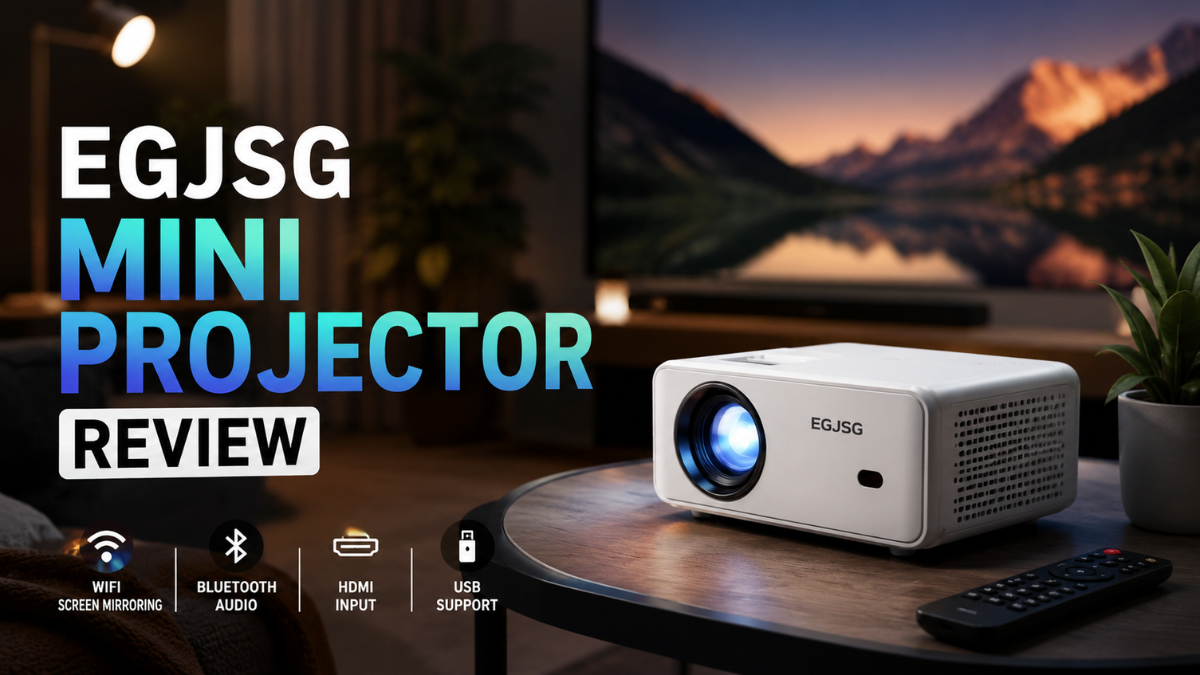
The EGJSG Mini Projector is a budget-friendly, portable projector designed for casual movie nights, bedroom viewing, phone mirroring, and outdoor use. The main thing to know before buying is simple: the exact EGJSG model matters because specs can differ between listings.
This EGJSG Mini Projector Review explains what to check, where it performs well, where it may disappoint, and how to decide if it fits your setup.
What Is the EGJSG Mini Projector?
The EGJSG Mini Projector is a compact home entertainment projector designed for people who want a bigger screen without buying a large TV. Depending on the model, EGJSG projectors may include WiFi screen mirroring, Bluetooth audio, HDMI input, USB support, a remote, a carry bag, or USB-C charging.
It is not the same type of product as a premium laser projector or a high-end 4K home cinema unit. It is better understood as a portable projector for casual viewing, small rooms, dorms, travel, backyard movie nights, and simple presentations.
From what I’ve seen, the biggest mistake buyers make is comparing budget mini projectors directly with expensive TVs. That is not fair. A mini projector is about screen size, portability, and flexibility. A TV is usually better for brightness, sharpness, and daily use.
Quick Verdict: Who Is It Best For?
The EGJSG Mini Projector is best for people who want an affordable, easy-to-move projector for occasional entertainment. It can be a good choice if you watch movies in a dark room, use a TV stick, connect an external speaker, and keep your expectations realistic.
It is not ideal if you want a bright daytime picture, true premium 4K detail, professional colour accuracy, or a replacement for your main living room TV.
Best use cases include:
- Bedroom movie nights
- Kids’ room entertainment
- Dorm room streaming
- Backyard movie sessions
- Casual gaming
- Travel-friendly presentations
- Temporary home cinema setups
Key Features to Check Before Buying
A practical EGJSG review should not only repeat product claims. You should check the exact model listing before purchase.
Important details to verify include:
- Native resolution, not only “supported” resolution
- ANSI brightness or real brightness measurement
- WiFi support, such as 2.4GHz or 5GHz
- Bluetooth version and whether it supports audio output
- HDMI, USB, AV, and headphone ports
- Manual focus, electric focus, or one-button focus
- Projection distance and screen size
- Warranty and return window
- Included accessories
- Current price and seller reputation
What most guides miss is the difference between native resolution and supported resolution. A projector may accept a 1080P or 4K signal but still display it at a lower native resolution. For buyers, native resolution matters more because it affects actual sharpness.
Picture Quality: What to Expect in Real Use
In real use, picture quality depends heavily on room conditions. A budget mini projector usually looks best in a dark room, on a flat white wall or proper projector screen, with the image size kept reasonable.
If you stretch the image too large, sharpness can drop. If you use it in daylight, the picture may look washed out. If the wall is textured or coloured, the image will not look as clean.
For movies and YouTube, the quality can be enjoyable if the room is dark. For text-heavy presentations, spreadsheets, or small subtitles, you should be more careful. A sharper native 1080P model will usually perform better than a native 720P model.
Sound Quality and Bluetooth Speaker Use
Built-in projector speakers are useful, but they are rarely the best part of a mini projector. For casual indoor viewing, the built-in speaker may be enough. For outdoor movie nights or a more cinema-like setup, a Bluetooth speaker or wired speaker is usually better.
A common mistake is placing the projector far behind the viewer and relying only on the built-in speaker. In many cases, the sound feels small because it comes from the projector rather than the screen area. A simple speaker placed near the seating area can improve the experience quickly.
Connectivity: Phone, Laptop, TV Stick, and Gaming
The EGJSG Mini Projector can be useful because it supports common connection methods depending on the model. HDMI is usually the most reliable option for laptops, TV sticks, gaming consoles, and streaming devices.
WiFi mirroring can be convenient for phones, but it may not always be the best option for movies. Streaming apps may block screen mirroring because of copyright rules. For Netflix, Disney+, Hulu, or Prime Video, a TV stick connected through HDMI is often the smoother route.
A practical setup looks like this:
- Connect a Fire TV Stick, Roku, Chromecast, laptop, or console through HDMI.
- Place the projector on a stable surface.
- Project onto a clean wall or screen.
- Adjust distance and focus.
- Connect external audio if needed.
- Dim the lights before judging image quality.
EGJSG Mini Projector Comparison Table
| Factor | EGJSG Mini Projector | Generic Budget Mini Projector | Entry-Level 1080P Projector |
| Best for | Casual movies and portable use | Low-cost basic viewing | Sharper home entertainment |
| Portability | Usually strong | Strong | Medium |
| Bright room performance | Limited | Limited | Better, but it still depends on brightness |
| Sharpness | Model-dependent | Often basic | Usually better |
| Audio | Built-in, external speaker recommended | Basic | Better but varies |
| Setup | Easy if using HDMI | Easy | Slightly more involved |
| Price range | Budget to mid-budget | Budget | Higher |
| Buyer risk | Model confusion | Overstated specs | Higher cost |
2026 Buying Considerations
In 2026, mini projector listings often use big claims such as “4K supported,” “high lumens,” or “outdoor cinema.” These phrases can be useful, but they do not always tell the full story.
Before choosing, check:
- Is it native 720P or native 1080P?
- Is brightness listed in ANSI lumens or vague marketing lumens?
- Does Bluetooth send audio out to speakers?
- Does it support your streaming device?
- Is the warranty clear?
- Are recent user reviews consistent?
- Is the seller official or third-party?
This matters because projector listings can change, prices can change, and different model names can look very similar.
How to Evaluate the EGJSG Mini Projector
Use this workflow after purchase or before finalising your review.
- Check the exact model number on the box and listing.
- Confirm native resolution in the manual or product page.
- Test it first in a dark room, not in daylight.
- Project onto a plain white wall or proper screen.
- Start with a medium image size instead of maximum size.
- Connect through HDMI for the first test.
- Try phone mirroring only after HDMI works.
- Play a movie scene, a YouTube video, and a text-heavy screen.
- Test the built-in audio, then compare it with a Bluetooth speaker.
- Let it run for 30–45 minutes and check fan noise, heat, and focus stability.
Common real-world issue: the picture looks blurry at the corners.
Practical fix: reduce screen size, make sure the projector is facing the wall directly, adjust focus slowly, and avoid projecting at a steep angle.
When the EGJSG Mini Projector Works Well
The EGJSG Mini Projector works best when the setup is controlled. A dark room, a smaller screen size, proper focus, a stable connection, and an external speaker can make the experience much better.
Use it if you want:
- A low-cost big-screen feeling
- A projector for occasional use
- A portable device for different rooms
- A simple backyard movie setup
- A screen larger than a laptop or tablet
When It May Not Be the Right Choice
This may fail when you expect TV-like brightness in daylight, sharp text for office work, or premium 4K detail. It may also disappoint if your wall is uneven, your room has too much light, or your WiFi connection is weak.
Avoid it if you need:
- Daily TV replacement
- Bright daytime viewing
- Professional presentation quality
- Accurate colour for design work
- Very low input lag for competitive gaming
- Guaranteed premium build quality
Is the EGJSG Mini Projector Worth It?
The EGJSG Mini Projector can be worth it if you treat it as a casual portable projector, not a high-end home cinema system. It is best for buyers who want flexible entertainment, easy setup, and a larger screen on a budget.
Before buying, verify the exact model, current specs, price, warranty, and return policy. If you find a native 1080P model with clear warranty support and recent positive reviews, it becomes a stronger option. If the listing is unclear or only highlights “supported” resolution without native resolution, compare alternatives before purchasing.
Mistakes, Risks, and Limitations
A common mistake is buying based only on “1080P supported” or “4K supported” claims. Supported resolution does not always mean the projector displays that resolution natively.
What most guides miss is model variation. One EGJSG listing may highlight USB-C charging, while another may focus on one-button focus, higher screen size, or native 1080P claims.
This may fail when the room is too bright, the wall is textured, the screen is too large, the projector is placed at an angle, or the user expects premium TV-level sharpness.
Other risks include:
- Overstated brightness claims
- Weak built-in audio
- Mirroring issues with streaming apps
- Fan noise during quiet scenes
- Heat after long sessions
- Confusing marketplace listings
- Price changes
- Warranty differences between sellers
What to do instead: verify the exact model, check recent reviews, use HDMI when possible, add an external speaker, and test it quickly while the return window is open.
FAQs
Is the EGJSG Mini Projector worth buying?
Yes, the EGJSG Mini Projector can be worth buying for casual movie nights and portable use. It is best when used in a dark room with realistic expectations and verified model specs.
What is the EGJSG Mini Projector used for?
The EGJSG Mini Projector is used for watching movies, mirroring phones, connecting laptops, gaming casually, and creating a temporary home cinema setup. It works best for entertainment, not professional colour-critical work.
Why do some EGJSG projector listings show different specs?
Some EGJSG projector listings refer to different models or updated variants. Always check native resolution, brightness, ports, focus type, and warranty before buying.
Is the EGJSG Mini Projector better than a TV?
No, it is not better than a TV for daily bright-room viewing. It is better if you want a larger portable screen for occasional dark-room or outdoor use.
What is the hidden risk with budget mini projectors?
The hidden risk is confusing marketing specs with real performance. In 2026, buyers should check native resolution, ANSI brightness, return policy, and real user photos before trusting listing claims.
Conclusion
The EGJSG Mini Projector is a practical choice for casual users who want affordable big-screen entertainment in dark spaces. It is not perfect, and it should not be treated like a premium 4K projector. But for bedrooms, dorms, outdoor movie nights, and occasional streaming, it can make sense if the price is fair and the model details are verified before purchase.
Read More About: Ponas Robotas