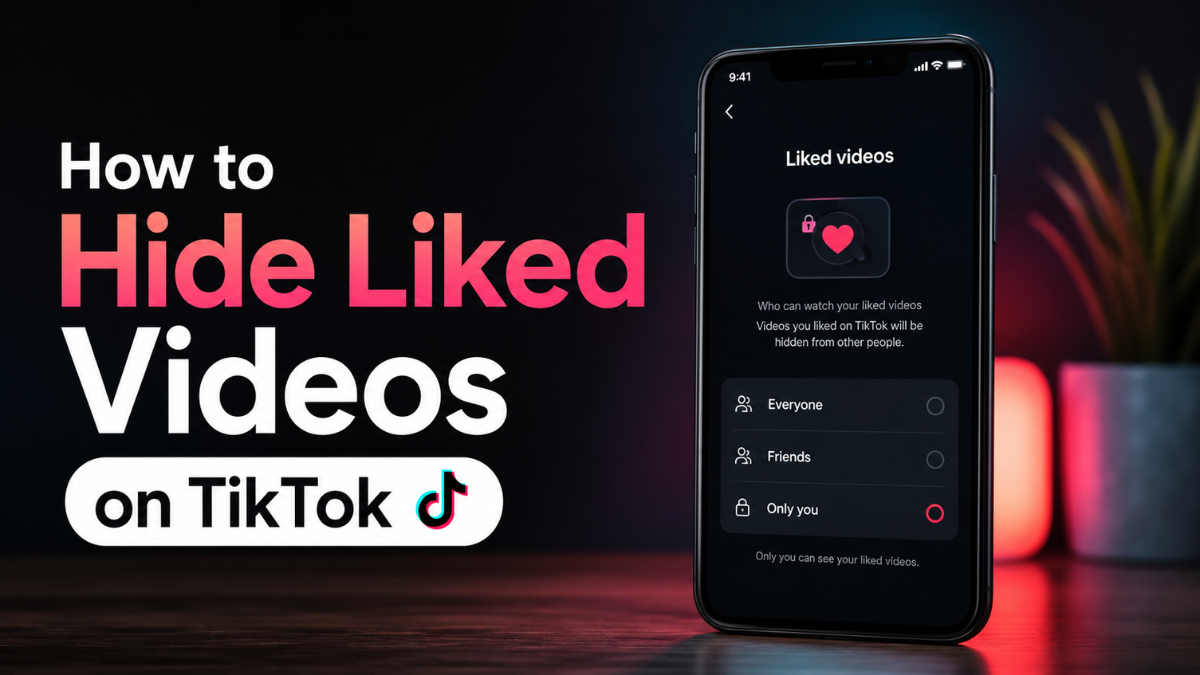
To hide liked videos on TikTok, go to Profile, tap the Menu icon, open Settings and privacy, choose Privacy, tap Liked videos, and select Only you. This stops other people from viewing the videos you have liked from your TikTok profile.
This is useful if you want more control over your TikTok privacy without making your entire account private.
What Does Hiding Liked Videos on TikTok Mean?
Hiding liked videos means other people cannot open your profile and browse the videos you have liked. Your likes may still influence your own recommendations, but they will not be openly visible in your profile’s liked videos area.
From what I’ve seen, many users confuse this with hiding their own posted videos. It is different. This setting controls the visibility of videos you liked, not videos you uploaded.
How to Hide Liked Videos on TikTok in 2026
Here is the simple workflow:
- Open the TikTok app.
- Tap Profile at the bottom.
- Tap the Menu icon in the top corner.
- Tap Settings and privacy.
- Open Privacy.
- Tap Liked videos.
- Choose only you.
Once this is selected, your liked videos become private to you. A practical way to check this is to ask a trusted friend to view your profile or check from another account.
What Happens After You Select “Only You”?
When you choose Only you, other users should not be able to see your liked videos tab content. They may still see videos you post, comments you leave, public reposts, profile photo, username, bio, and other visible account activity, depending on your settings.
In real use, this setting is best for people who like videos casually and do not want every interest, joke, trend, creator, or sensitive topic visible to others.
Public Account vs Private Account
| Setting | What It Does | Best For |
| Public account + liked videos public | More open visibility | Creators who want transparent engagement |
| Public account + liked videos Only you | Public profile, private likes | Most users who want simple privacy |
| Private account + approved followers | More control over profile access | Personal accounts |
| Private account + liked videos Only you | Strongest simple privacy setup | Users who want fewer visibility risks |
A common mistake is thinking a private account automatically hides everything. It gives more control, but you should still review individual privacy settings, such as liked videos, comments, direct messages, mentions, and profile suggestions.
Why People Hide Liked Videos
People hide liked videos for different reasons:
- They do not want coworkers or classmates browsing their interests.
- They follow niche hobbies or private topics.
- They want to avoid judgment from friends or family.
- They use TikTok for research, entertainment, or trend monitoring.
- They want a cleaner public creator profile.
What most guides miss is that hiding liked videos is not only about secrecy. It is also about separating your personal viewing habits from your public identity.
What This Setting Does Not Do
Hiding liked videos does not remove your likes. It also does not fully reset TikTok’s recommendation system. TikTok may still use your engagement signals, watch time, searches, follows, and interactions to personalize your For You feed.
If your goal is to change what TikTok recommends, also use Not interested, clear watch history where available, unfollow irrelevant accounts, and search for better content signals.
Mistakes, Risks, and Limitations
A common mistake is assuming hiding liked videos makes your whole TikTok account private. It only changes liked-video visibility.
What most guides miss is that likes are only one privacy signal. Comments, reposts, mentions, followers, following lists, profile views, and suggested account settings can still reveal activity.
This may fail when TikTok changes the app layout, your app is outdated, or the setting has a different name in your region.
Other risks and limitations:
- Old tutorials may show outdated menus.
- Hiding likes does not erase past engagement.
- It does not reset the For You algorithm.
- It may not stop someone from seeing comments you leave.
- It does not replace careful account privacy management.
What to do instead: combine liked-video privacy with private account settings, comment controls, profile suggestion controls, and better content preference management.
When the Setting Is Missing or Does Not Work
This may fail when your app is outdated, TikTok is testing a new interface, your region has different settings, or the app cache is causing display issues.
Try this:
- Update TikTok from the app store.
- Close and reopen the app.
- Check Settings and privacy again.
- Clear app cache.
- Search for Privacy settings inside TikTok settings.
- Log out and back in only if needed.
If the option still does not appear, verify TikTok’s current Help Center guidance before publishing or recording a tutorial.
2026 Privacy Considerations
In 2026, social platforms will continue changing privacy menus, recommendation controls, and account visibility settings. Before publishing a guide, verify the current TikTok interface on both iOS and Android, if possible.
This matters because old screenshots can quickly become misleading. A helpful guide should explain the path, the purpose of the setting, and what to do if TikTok moves the option.
Should You Hide Your Liked Videos?
You should hide your liked videos if you want more privacy, use TikTok for personal browsing, or have a public-facing profile. It is a low-effort setting with a clear benefit.
You may not need to hide them if you are a creator who wants followers to see your taste, collaborations, or community engagement. Even then, privacy usually matters more than public-liked video visibility.
Conclusion
For most users, the best option is to set Liked videos to Only you. It keeps your profile cleaner, protects your viewing habits, and does not stop you from liking content normally.
If you want stronger privacy, combine this with a private account, limited profile suggestions, restricted comments, and careful direct message settings.
FAQs
Can people see my liked videos on TikTok?
Yes, people may see your liked videos if your settings allow it. Set Liked videos to Only you to keep them private.
How do I make my liked videos private on TikTok?
Go to Profile → Menu → Settings and privacy → Privacy → Liked videos → Only you. This is the main setting for hiding liked videos from profile visitors.
Does hiding liked videos affect the TikTok algorithm?
No, hiding liked videos mainly affects profile visibility. TikTok may still use your likes, watch time, and interactions to personalize your feed.
Is it better to make my whole TikTok account private?
A private account is better if you want broader control over who sees your content. But if you only want to hide liked videos, the Only you setting is usually enough.
Why can’t I find the Liked videos setting?
The setting may be missing because your app is outdated, TikTok changed the interface, or your region has a different layout. Update the app and check TikTok’s current Help Center before assuming the feature is gone.