Technology has become an essential part of modern work. Whether you work from an office, a home workspace, or while traveling, the tools you use each day can significantly influence your productivity and efficiency. The right technology does more than simply help you complete tasks—it streamlines your workflow, reduces distractions, and creates a more comfortable work environment.
From better connectivity solutions to smarter workspace setups, choosing the right tech tools can make a noticeable difference in how smoothly your workday runs.
Building a More Efficient Digital Workflow
One of the biggest advantages of modern technology is its ability to simplify complex tasks. Digital tools help workers organize schedules, collaborate with colleagues, and manage projects more efficiently.
Cloud-based software, for example, allows teams to work together on documents in real time, eliminating the need to constantly send files back and forth. Task management platforms help individuals track responsibilities and deadlines, ensuring that important work stays on schedule.
By using the right digital tools, professionals can reduce time spent on repetitive tasks and focus more on meaningful work.
Creating a Comfortable Workspace
Productivity is closely tied to comfort. A poorly organized or uncomfortable workspace can make even simple tasks feel difficult. Many professionals spend hours each day working on laptops, which can lead to fatigue if the setup is not optimized.
Adjusting your workspace can significantly improve your daily experience. Using a laptop stand, external keyboard, and proper lighting can help reduce physical strain and improve focus.
A clean and organized desk also plays an important role. When cables, devices, and accessories are arranged neatly, it becomes easier to concentrate on work rather than dealing with clutter or distractions.
Improving Device Connectivity
Modern laptops are powerful, but many of them come with limited ports. This design makes devices thinner and more portable, but it can create challenges when connecting multiple accessories such as monitors, keyboards, or storage drives.
One common solution is using a USB C Hub to expand the available ports on a laptop. This type of accessory allows users to connect additional devices without constantly switching cables. For professionals who use multiple peripherals, this can save time and simplify daily workflows.
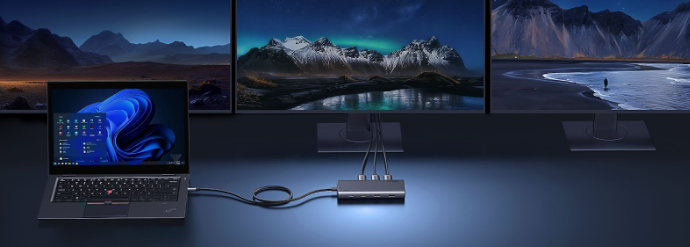
Another option is using a laptop docking station, which acts as a central hub for connecting several devices at once. Instead of plugging each accessory directly into the laptop, users can connect everything through the docking station with a single cable.
Supporting Multi-Device Workflows
Many professionals rely on several devices during the workday. A laptop may be used for primary tasks, while external monitors, storage drives, and input devices support more complex workflows.
Managing multiple devices becomes easier when the workspace is designed for efficient connectivity. For example, a docking station can allow users to connect displays, keyboards, and networking cables simultaneously. This setup allows workers to quickly transition between mobile and desk-based work without constantly reconnecting accessories.
These solutions are especially helpful for remote workers, designers, developers, and analysts who need access to multiple devices at once.
Reducing Distractions with Smart Technology
Technology can both help and hinder productivity depending on how it is used. While digital tools can streamline tasks, constant notifications and alerts can also interrupt focus.
A useful habit is limiting unnecessary notifications during work hours. Many devices include focus modes or “Do Not Disturb” settings that allow users to temporarily silence distractions.
Noise-canceling headphones are another helpful tool for maintaining concentration. By reducing background noise, they allow workers to stay focused even in busy environments.
Using technology intentionally helps create a workday that is both productive and less stressful.
Enhancing Collaboration
Collaboration is a major part of modern work, especially for distributed teams. Digital communication tools allow people to stay connected even when working from different locations.
Video conferencing platforms make meetings possible without travel, while team messaging apps allow coworkers to share updates quickly. File-sharing platforms also make it easier to collaborate on projects without worrying about version control.
When combined with reliable hardware setups—such as workstations supported by a USB C Hub or a laptop docking station—these communication tools help teams remain productive regardless of where they are located.
Maintaining Device Performance
Another way technology improves the workday is by helping users maintain the performance of their devices. Regular updates, system maintenance, and organized storage all contribute to smoother workflows.
Keeping software up to date ensures compatibility with the latest applications and security standards. Cleaning unnecessary files from storage can also help devices run faster and more efficiently.
When devices operate smoothly, workers spend less time troubleshooting technical issues and more time focusing on meaningful tasks.
Adapting Technology to Your Workflow
Every professional has a different workflow. Some people require complex setups with multiple displays and peripherals, while others prefer a simple and portable workspace.
The key is selecting tools that match your working style. For some users, a portable USB C Hub provides enough connectivity for everyday tasks. Others may benefit from a full workstation setup supported by a docking station that connects multiple devices and monitors.
Understanding how you work helps you choose technology that supports your productivity rather than complicates it.
Final Thoughts
Technology has transformed the way people work, offering tools that simplify tasks, improve communication, and enhance productivity. By choosing the right devices and developing effective tech habits, professionals can create a more efficient and comfortable workday.
Accessories like a USB C Hub, a reliable laptop docking station, or a versatile docking station can help expand connectivity and support modern workflows. Combined with thoughtful workspace organization and digital productivity tools, these technologies make it easier to stay focused and accomplish more each day.
Ultimately, the right tech tools are not just about convenience—they are about creating a work environment that allows you to perform at your best.